The problem
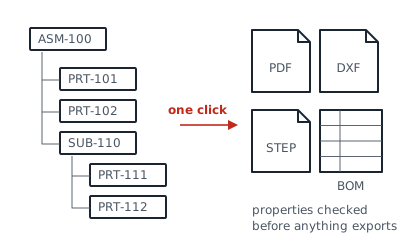
Releasing a drawing package by hand means opening every drawing, exporting each format, renaming files and catching the missing material or revision. On a 60-part assembly that's an afternoon, and errors still slip through.
How I approached it
- Traverse the top-level assembly and collect each unique part, subassembly and drawing.
- Check required custom properties first, and stop with a clear list if anything is missing.
- Export each file type by rule: PDF for every drawing, DXF for sheet metal flat patterns, STEP for purchased-part vendors.
- Write the BOM to an Excel template and save everything to a dated release folder.
Results
A release that took [X] minutes by hand now takes [Y] minutes, with no missed exports. [Record the demo video on the weld fixture assembly.]
What was delivered
- Macro source, commented
- Setup notes for property names and folder rules
- A short walkthrough video